
Friday, November 10, 2006
New Gmail Features
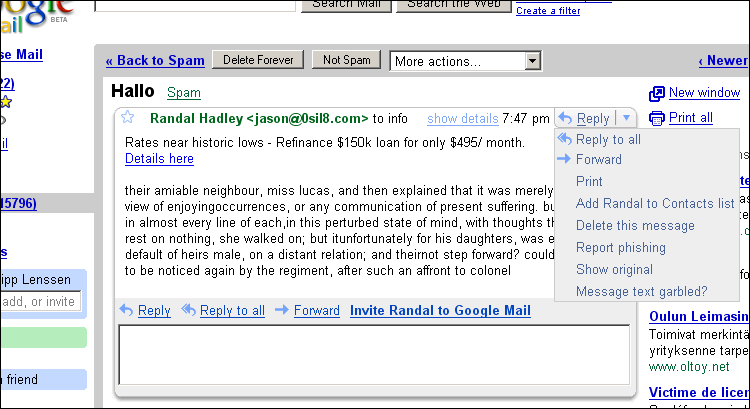
There are a couple of new Gmail features being currently rolled out:
- A design change replaces the “show details” option pane with a dropdown menu at the top right, which now also includes a “Reply” button. It’s interesting to see how close this button is placed towards the right-hand side ads – I bet this increases click-thru rates (cash) for Google.
- Several actions, like reply, reply to all, and forward, received new icons.
- Now when you’re preparing a reply to a thread and a new reply from someone else arrives in-between, you’ll receive an alert. The Gmail team calls this feature embarrassment-reducing message notifications.
- The details menu has been revamped. It now feels easier to read, and more integrated.
- A “forward all” feature to keep others up-to-date if they missed a conversation. I didn’t get this one in my Gmail yet, it seems.
Gmail seems to need a design consolidation by now – there are too many different interface elements to trigger specific actions. There are: links; DHTML combo boxes; HTML combo boxes; and HTML buttons. All of these elements have subtle differences in design and behavior which makes it harder to allow for streamlined interface usage. Also, by now, smaller design errors are creeping in; there are sometimes pixels missing in the design, and at other times, popup blocker warnings show in the latest stable Firefox 2. Other icons suffer from the “mystery meat” navigation syndrome: just by looking at them it’s unclear what they’re there for (like the small “x” next to a name, which I think is supposed to indicate that you wrote the mail).
Still, Gmail usability is a far cry from some of the competitor products... I’ve been playing around a bit more with Hotmail-successor Windows Live Mail lately, and in comparison its usability is just plain horrible.
Join the ongoing forum comments.
[Thanks Norm C., Derek M., Orli Yakuel, Ulf G., Torben K., Kevin, Herman Y., Tony Ruscoe, Maxim L. and Guillaume Q.!]
>> More posts
Advertisement
This site unofficially covers Google™ and more with some rights reserved. Join our forum!